How an agency can make videos for several channels
AutoVideoStudio gives an agency one workspace with team roles (owner, admin, editor, viewer), a brand kit per channel (colours, caption style, font, logo, music mood and a copy-your-channel-style sample), an API to create videos from your own tools, and on every video the exact cost per finished minute and a licence ledger you can hand to a client.
Last updated 1 November 2026 · by Venu Gopal Reddy Muvva, founder
Who this is for
Agencies and small media teams producing for several channels or clients, who need consistency and proof.
Steps
- 1. Create a free account
Sign up with your name, email and a password. No card. Your first 3 months are free with every feature unlocked, and onboarding makes a 1-minute sample video straight away so you see the whole pipeline.
- 2. Add a brand kit per channel
On Brand kits, set colours, fonts, caption style, logo and music mood, and paste a few titles or a script so new scripts match that channel's style.
- 3. Invite your team
In Settings & team, add people who have an account as admin, editor or viewer.
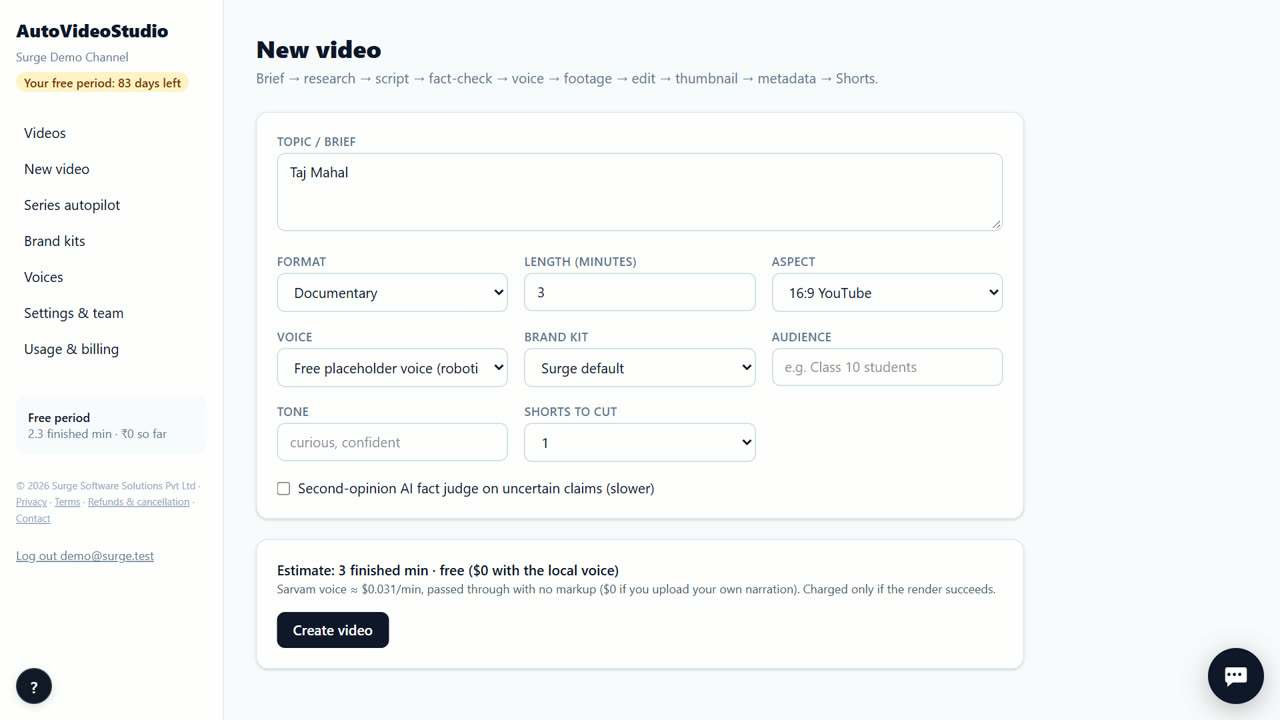
- 4. Write the brief
On New video, type the topic in one line and pick the format (any format) and the length (1–60 minutes). Choose 16:9 for YouTube or 9:16 for Shorts, and add the audience and tone if you want.
- 5. Fix what the fact-check flags
Every sentence with a number or a name is matched to its source. If a number is wrong or a claim isn't in the sources, the video pauses. Edit the line, or confirm you checked it, and the render continues.
- 6. Download and post
Download the 720p MP4, the vertical Shorts, two thumbnails, and the title, description (with chapters, sources and credits) and tags. Upload them to your channel yourself — direct upload is coming soon.
Tips
- Use the API (POST /api/v1/videos with a workspace key from Settings) to create videos from a sheet or your CMS.
- Give clients viewer access so they can watch drafts without editing.
- The cost line on each video shows what it cost, so you can bill clients accurately.
- Keep a copy of each video's asset ledger (the Asset ledger tab) with the client files.
When AutoVideoStudio is not the right tool
AutoVideoStudio is not the right tool if each client needs a separate login and billing account today — one workspace pays for its videos. It also doesn't publish to clients' channels for you yet.
Questions
Is there an API?
Yes. POST /api/v1/videos creates a video; GET returns its status, files, fact-check result and cost.
Can each channel have its own style?
Yes, one brand kit per channel, including a style sample the script writer copies.
How are videos billed?
Free for 3 months, then per finished minute at our cost from the workspace wallet. Failed renders are never charged.
What does it cost?
Nothing for your first 3 months. After that you pay only for what you use, at our cost — about ₹0.25 per finished minute (est.), so a 10-minute video is about ₹2.50. No subscription.
Free for your first 3 months. Then pay only for what you use.
Start free — 3 months on usRelated: How to run a weekly YouTube series on autopilot · How to make a YouTube video with copyright-safe footage · AutoVideoStudio vs Synthesia · Pricing